


One of the most basic thing which you need to learn about self hosted WP blog is to install WordPress plugins. There are many ways by which you can install a plugin in WordPress blog, you can use any of these three methods to quickly add a plugin:
- Install plugin by Searching from dashboard
- Upload .zip folder to WordPress and install
- Install via FTP
I won’t recommend installing by FTP until you don’t have permission to install a plugin from dashboard, and most of the recommended hosting companies like Bluehost, Hostgator gives you enough permission to add plugins from dashboard. I have already shared a list of must have plugins for WordPress blog, you can refer to it to get the best of plugins for your blog, and read on this tutorial to learn the whole process.

If you are complete new to WordPress and Blogging, you can read following guide to get started:
- What is WordPress & other interesting bits
- How to Install WordPress blog
- How to set up WordPress for the first time
How to Install plugins from WordPress dashboard:
If you wish to search plugin from WordPress plugin repo, you can simply get the name of the plugin and do a search from dashboard and install it.
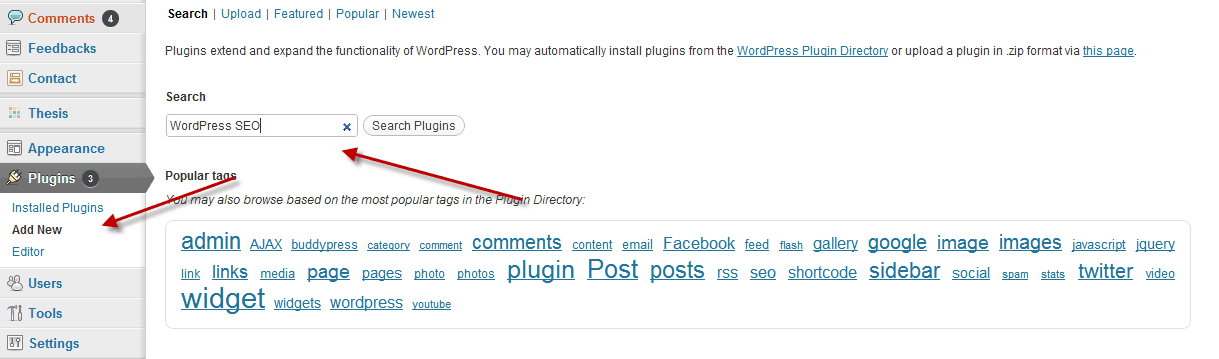
- Login to your WordPress dashboard.
- Click on plugins> Add New
- Search for plugin which you wish to install.
- Click on Install now
- Activate the plugin and configure it’s settings.
That’s it and you are done installing the plugin. There are many plugins which are old and have not been updated for years, but they are still very useful. Since you can’t install such WordPress plugins by searching, you can download the .zip folder from official repo and install it. Here is a quick guide on installing .zip format plugin:
- Login to WordPress dashboard
- Click on plugin > Add New > Upload
- Click on upload > browse the .zip file > Install plugin
- Activate and configure settings
This is pretty easy and below I have added a video tutorial which will give you a better understanding of the whole process. Also, when you are downloading plugin, make sure you download it from credible sources like WordPress plugin repo, Codecanyon , or official plugin page of plugin developers. Avoid downloading plugins from any non credible sources like free file sharing sites, torrents.
Video guide to Install WordPress plugins:
In this guide, I have explained both the process (Install plugin via searching, upload .zip file and install plugins) and it will give you a better idea of using plugins feature in WordPress.
I hope this guide helped you to understand this basic but one of the most important part of using WordPress blog. If you still have any question regarding the whole process of plugin installation in WordPress, feel free to let me know via comments.





ADD COMMENT