


Most of the time, a blogger when starts with a self-hosted WordPress blog, he forgets about changing WordPress permalinks. And at the later stage, to change WordPress permalink, we have to do many things to make sure permalink change is 301 redirection.
WordPress is search engine friendly Blogging platform but when it comes to the permalink, default permalink is ugly and doesn’t add value to overall blog SEO.

- For example wpsutra.com/?p=123 (Default and Ugly)
- wpsutra.com/free-wordpress-blog-set-up (Pretty and SEO friendly)
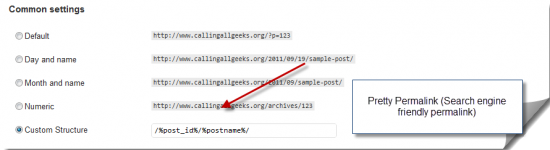
Needless to say, a search engine friendly permalink will be helpful to increase your search engine traffic. If you just installed WordPress, you can simply change your WordPress permalink to anything:
- /%post_id%/%postname%/
- /%postname%/
- /%year%/%monthnum%/%day%/%postname%/
and many more combinations. Though I prefer the first one as it helps in faster loading of your blog and if you are running a news site and wish to get featured on Google News, permalink with numbers is mandatory. and Now the problem is if you are running a WordPress blog and you change permalink now, your old posts will give 404 errors.
Though WordPress handles the permalink rewrite internally but due to permission issues, you won’t be able to change it directly and here is a quick Workaround that worked for me and I successfully changed the permalink of my iPhone blog from /%postname%/ to /%post_id%/%postname%/.
One of the oldest way to change your WordPress permalink in search engine friendly manner is by using Dean’s permalink migration plugin, but when I tried this plugin today, it didn’t work for me, and I realize the plugin has not been updated from long.
So here is an alternative and basic method that you can use to change WordPress permalink without 404 errors and most important it will search engine friendly.
How to change WordPress Permalink Structure:
Login to your FTP account and change the permission of the .htaccess file to 777.
Go to Settings > Permalink under WordPress dashboard and change your permalink to custom permalink and enter your desired permalink structure. More on SEO friendly WordPress permalink structure on another post, but you can quickly grab more info on WordPress permalink from official page
Click on update and open any link from the search engine. You can search using site:domain.com in Google and open link and see if it’s getting redirected to new permalink structure or giving 404 error.
In most of the client site which I worked, this method worked to make search engine friendly permalink migration. Now change your .htaccess file permission back to 644.
How to check if Permalink redirection is 301 redirection:
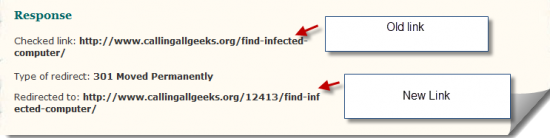
This is the most obvious question you might be having after making changed into your permalink. Go to any of these sites and insert the link with the old permalink and it will show you if the redirection is 301 (search engine friendly) or not.
Here is a screenshot of my redirection and you can quickly check it’s a 301 redirection:
That’s it and now take care of normal on page SEO and keep reading WPSutra for more such useful WordPress SEO tips.
If you face any problem while changing WordPress permalink, feel free to ask questions via comments.





The only bad thing that happens is you lose all your facebook share and tweet counts 🙁
Wish there was a way to retain those numbers.
@Puneet that’s true. Specially if you have a blog with tons of shares on social networking site. Though you won’t lose any traffic and new SEO friendly permalink structure will make sure you get more traffic and thus more share in the future.
I wonder what would happen, if I export the wordpress posts as XML (from Tools), and then reconfigure a fresh install with a new DB, and import the XML. Now on this blog, what if I change permalink structure; would the old google indexed permalinks still redirect properly.
If not, does it mean, when I change the permalink structure in the old blog, does it save some value in the DB/.htaccess file?
I wish i have found this article earlier. But it says that it never too late so i will be changing my blog’s permalink now.
Hi Harsh,
Here you have mentioned to change permalink by using FTP. But from Worpdress dashboard settings>permalink, we can also change permalink easily. Do you think this is ok or using FTP is better? Thanks.
You’re a life saver!! Wish I’d found this sooner! Thanks a lot!
Hello,
I was using a permalink that end with .html before e.g /%postname%.html but now I have removed it and change it to /%postname%/ please how can I 301 redirect without loosing my traffic and getting 404’s errors, my site is now increasing in not found error.
Please Help!
Hi Harsh,
After changing my permalink structure my old post still are not been redirected to the new. I have tried using the redirect plugin, worked on the .htaccess all other instructions but it seems not to take effect. I really need your assistance on this. Am loosing out on traffic.
it’s not working new permalink structure. although changed permission 644 to 777.
Hi, I though changing permalinks would effect only new posts so I changed it, later I observed that all the links redirected to 301 so I installed the plugin Redirection (John Godley) and add the redirection of all 94 indexed posts in it.
Right now all my 94 blog posts are indexed with the old permalinks but as I have mentioned that I’ve already redirected it using a plugin, so my question is that what will happen next, I mean how Google bots will manage it or I have to do something else to fix it?